Design engineering & AI
Agentic design engineering
From manual handoff to planner-executor loops and MCP. Thirty minutes.
Christoph Hellmuth · Design Engineering Studio
Introduce yourself and the transition this talk addresses.
I am Christoph Hellmuth. I run a design engineering studio. I have spent sixteen years standing in the seam between design and front-end code, building systems like Aurora at Nord for dozens of squads.
For the last fifteen years, the handoff between design and engineering was manual labor. We exported PNGs, drew redlines, annotated 8px spacing in Zeplin, and wrote long Jira tickets explaining what a hover state should look like.
That entire workflow is now obsolete.
With Model Context Protocol and modern agentic coding, an AI agent can read the Figma node tree directly, map it to your canonical React package, and generate a working, typed pull request in thirty seconds.
This talk is about what design engineering looks like when manual handoff disappears. We will cover the MCP bridge, the Planner-Executor architecture, automated CI gates, and how our craft evolves from moving pixels to governing autonomous systems.
Let us begin with the end of handover.
The shift
The end of manual handover.
Designers stop clicking 'export.' They start owning system compilation.
Say it plain.
Clicking 'Export PNG' was never design craft. Inspecting CSS redlines in Figma was never engineering craft. They were mechanical translation taxes we paid because our tools could not talk to each other.
Today, Figma is an API. Git is an API. Model Context Protocol is the bridge.
When an agent reads the Figma canvas, it does not see a picture. It sees an Abstract Syntax Tree of auto-layout frames, semantic variable bindings, component set properties, and Code Connect mappings.
The handoff meeting is dead. The design engineer's new role is writing the compiler that turns design intent into production code.
The program executes the pattern.
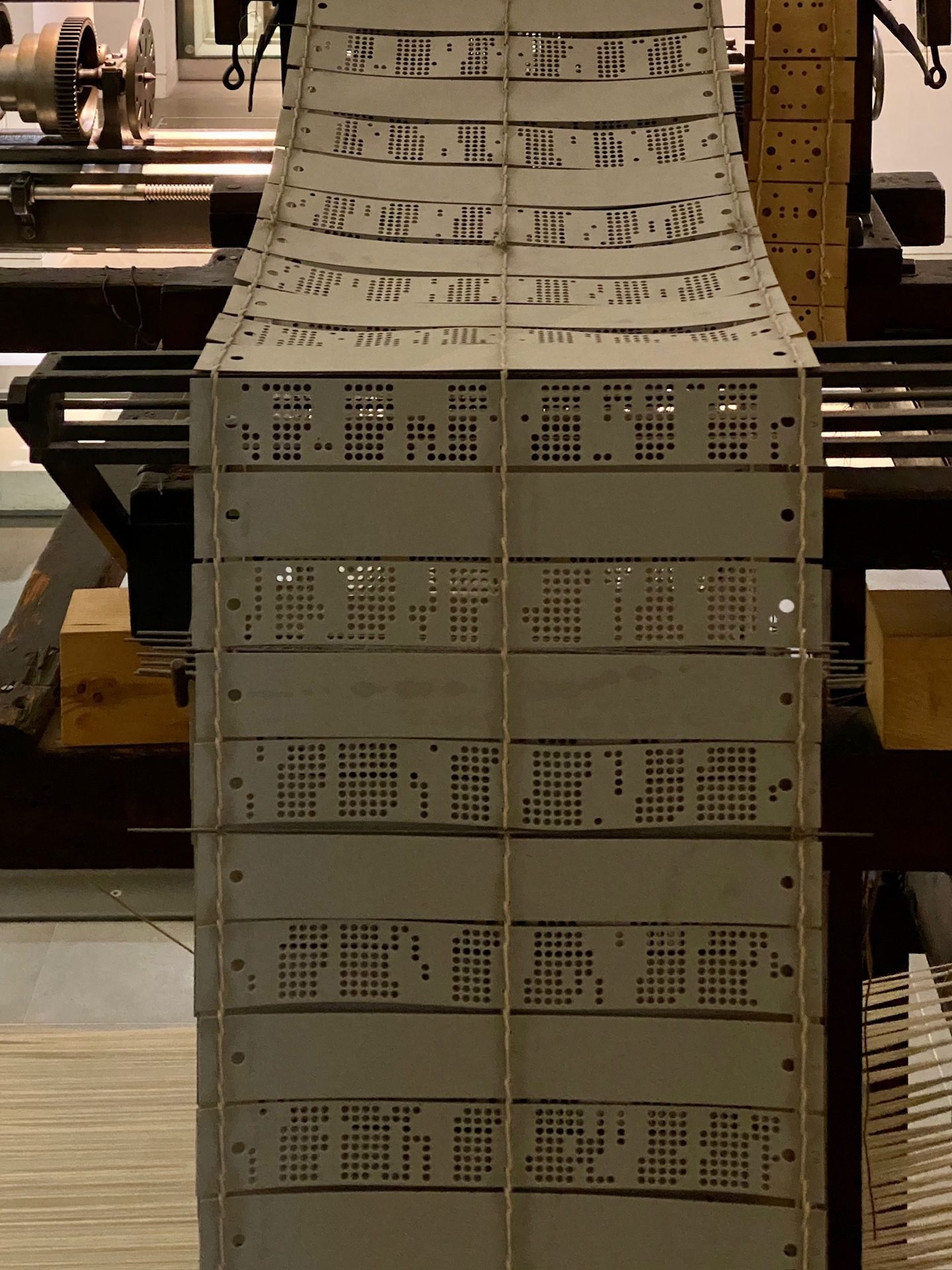
National Museum of Scotland. A Jacquard loom from the nineteenth century.
Joseph Marie Jacquard did not stand at the loom throwing the shuttle by hand for every thread of a damask pattern. He designed the card chain. The punched holes encoded the program, and the mechanical loom executed the weave.
Agentic design engineering is that same transition for interface.
We do not manually write every `<div>` and CSS class. We design the token taxonomy, the component constraints, and the prompt harness. The agent executes the weave across the codebase.
The problem
One-shot prompting fails on enterprise UI.
Complex interfaces require multi-stage decomposition: Planner, Executor, and Critic.
Everyone starts with one-shot prompting: 'Build me an enterprise dashboard in React.'
It looks impressive for ten seconds, until you inspect the output. The agent hallucinated thirty inline CSS colors, forgot loading spinners, dropped keyboard tab order, and created an unmaintainable 800-line single-file monster.
Real software cannot be one-shotted.
In our studio, we use a multi-agent architectural loop:
The Planner decomposes the screen into a structured component graph.
The Executor implements one canonical component at a time.
The Critic validates the result against automated linters, contrast checks, and visual diffs.
Decomposition turns generative chaos into reliable engineering.
Structure
Four steps in the agentic workflow.
- 01
Figma as an APIReading the canvas AST via Model Context Protocol (MCP).
- 02
The Planner-Executor LoopDecomposing complex screens into component trees without hallucinations.
- 03
Automated Quality GatesEnforcing tokens, accessibility, and bundle budgets in CI.
- 04
The Evolved CraftHow design engineering shifts from syntax transcription to systems architecture.
Four chapters over the next 26 minutes.
First, how agents read Figma as a living API through MCP.
Second, how the Planner-Executor architecture constructs production UI.
Third, the automated quality gates that prevent code rot.
Fourth, how to hire and staff design engineering in this new reality.
Let us look at Figma as an API.
Part 01
Figma as an API
The canvas is an AST, not a picture.
Part one: Figma as an API.
Architecture
What the agent sees through MCP.
- 01
Component Node TreesNested auto-layout frames, flex directions, paddings, and alignment rules.
- 02
Bound VariablesDirect references to semantic token collections: 'action.primary', 'surface.card'.
- 03
Component Set VariantsThe full matrix of interactive states: hover, focus, disabled, loading, active.
- 04
Code Connect MetadataThe exact link to the production React component and repository export.
When an agent connects to Figma via Model Context Protocol, this is what it reads:
It reads the component node tree with auto-layout constraints. It reads bound variables, so it sees semantic tokens rather than raw hex. It reads component set variants, so it understands which states exist. And through Code Connect, it reads the exact React package import.
The agent is not performing computer vision on a screenshot. It is parsing an Abstract Syntax Tree of design decisions.
Tokens as AST
The token is the contract, not the hex.
When the agent reads the node, it reads the semantic role, not the raw RGB coordinates.
If an agent reads '#081259', it has to guess what that color means. Is it a primary button? A header border? A dark mode surface?
When it guesses, it makes reasonable mistakes that pollute your codebase.
When the agent reads 'var(--action-primary)', there is zero guesswork. The token explicitly declares the intent: this element is the primary interactive affordance on this surface.
Tokens are not just for humans; they are the semantic metadata that makes AI agents deterministic.
Keyboard to metal in one mechanical pass.
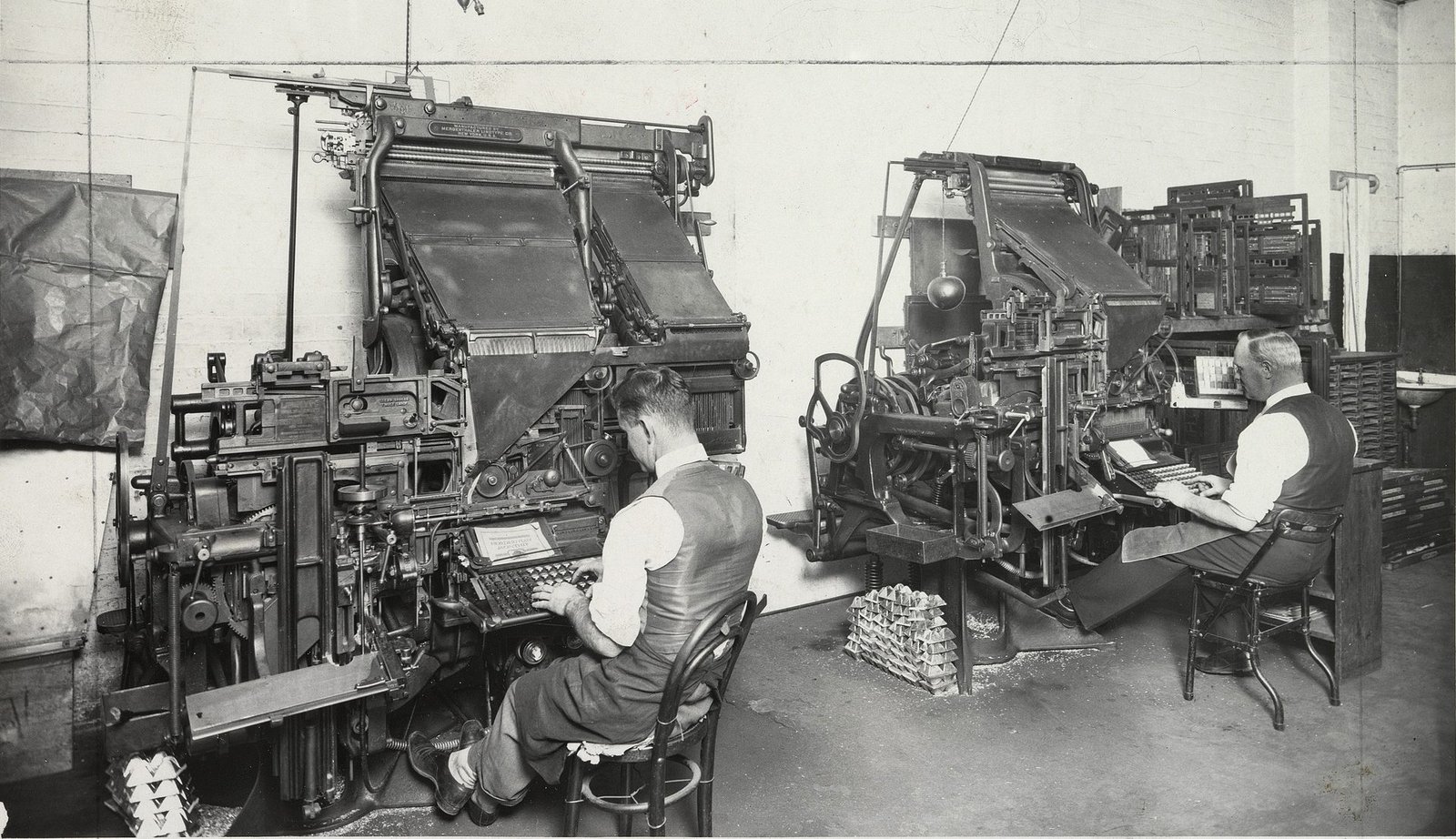
Linotype machines, Sydney, circa 1935.
Before the Linotype, a compositor had to pick every letter from a type case by hand. Ottmar Mergenthaler automated that pass: you typed on a keyboard, and the machine cast a complete line of lead type instantly.
That is what MCP does for design engineering.
The designer specifies the frame in Figma; the agent compiles the React code directly into git. What took two days of hand-coding now happens in thirty seconds.
The bridge
MCP still needs a review.
Agents handle volume. You keep judgment, taste, and governance.
Do not mistake automation for autonomy.
An agent can draft ten pull requests in an afternoon. It can generate twenty variant tests. But the agent does not know whether this checkout flow complies with German privacy laws. It does not know if this micro-interaction feels delightful or irritating.
Agents handle the volume of boilerplate. The human design engineer provides judgment, taste, and final governance.
Part 02
The planner-executor loop
Building complex UI without one-shot hallucinations.
Part two: The Planner-Executor loop.
The loop
Planner, executor, critic.
- 01
The PlannerInspects the Figma screen, maps layout regions, matches components to '@studio/ui', flags missing variants.
- 02
The ExecutorImplements components sequentially, connects typed props, wires semantic tokens, writes Storybook stories.
- 03
The CriticRuns automated tests: contrast, accessibility, bundle size, TypeScript compile. Sends diffs back for refinement.
Here is how we construct complex digital products with agents.
Phase one: The Planner. It inspects the screen and generates a task graph. It says: 'Header needs NavigationMenu; Body needs a 3-column Grid; Column 1 needs ProductCard.' If a required variant is missing, it flags it before writing code.
Phase two: The Executor. It takes one task at a time. It never tries to write 500 lines at once. It imports `<ProductCard />`, binds props, and writes a test.
Phase three: The Critic. It runs automated checks. If contrast fails, it rejects the diff and asks the Executor to fix the token binding.
You review the final plan before merging.
Edge cases
Automate the edge cases you used to skip.
Ask the agent to generate the empty state, the German translation overflow, and the network error variant.
Be honest: in manual design, what happened to the unsexy states?
Did you design the zero-search-results screen? Did you test what happens when a German customer with a 45-character last name fills out your input? Did you test the offline network failure state?
Usually, those got skipped because time ran out.
An agent can generate all eight edge cases in twenty seconds. Let the agent do the tedious work of state completeness so your production apps never crash on unhandled states.
The press runs at speed once the plates are aligned.
An industrial offset press.
Once the printing plates are aligned, the press prints 10,000 sheets an hour without pausing. But if the cyan plate is misaligned by a single hair, every single sheet is a misprint.
Aligning the plates is the human design engineer's responsibility. Running the press at speed is the agent's job.
Workflow
Old handoff vs agentic compilation.
01Old Manual Handoff3 days exporting PNGs and annotating redlines in Figma. 2 weeks of engineering back-and-forth in Slack. 4 review meetings. High production drift.
02Agentic Compilation30 seconds Figma MCP inspection. Planner creates component task graph. Executor drafts typed PR. 1 human architectural review. Zero drift.
Look at that contrast.
Two weeks of friction drops to thirty minutes of structured compilation.
Engineering teams no longer view design system components as a bureaucratic bottleneck; they view them as the fastest way to ship product.
Part 03
Governance at scale
Preventing component explosion when everyone codes.
Part three: Governance at scale.
What happens when every designer and junior developer on your team can prompt an agent to write React code?
Quality gates
Three gates before git merge.
- 01
The Token LinterFails automatically if the agent injected inline CSS, hardcoded hex values, or arbitrary pixel margins.
- 02
The Component Import CheckFails if the agent re-implemented a button or modal that already exists in '@studio/ui'.
- 03
Visual Regression TestCompares rendered headless browser output against the Figma canvas frame at 100 percent pixel match.
Without automated gates, agentic coding leads to catastrophic codebase pollution within three months.
You need three automated gates in your CI pipeline:
Gate one: The Token Linter. If an agent writes 'color: #081259', the PR build fails.
Gate two: The Import Check. If an agent writes a custom `<button>` tag instead of importing `<Button variant="primary">` from your library, the PR build fails.
Gate three: Visual Regression. Headless Playwright renders the component and verifies pixel parity against the Figma design.
These gates protect your codebase while agents write code at scale.
Human in the loop
You own the gate, not the keyboard.
The design engineer's value shifts from typing syntax to approving architecture and enforcing contracts.
Your value as a design engineer was never typing `const Button = () => <div>`.
Your value is knowing how a design system scales across fifty squads. Your value is understanding WCAG 2.1 accessibility laws in Europe and the US. Your value is ensuring that customer data flows securely.
Do not cling to typing syntax. Own the gate. Own the contract.
The chain holds the memory.
Punched card chains from a Jacquard loom.
The individual weaver may take a holiday or leave the mill. The card chain preserves the pattern memory permanently.
Your design system repository is that card chain. When an engineer leaves your team, the agentic prompt rules and token contracts preserve your standards without loss of continuity.
Velocity
Speed without governance is just faster debt.
An agent shipping ten pull requests a day without a system will collapse your codebase in two quarters.
Velocity is a multiplier.
If your design system foundation is sound, velocity multiplies productivity. If your foundation is broken, velocity multiplies technical debt by a factor of ten.
Before you accelerate development with AI, make sure your brakes and steering work.
Part 04
The evolved role
Business, syntax, and prompt engineering.
Part four: The evolved role.
Installation
How to install agentic workflows in 30 days.
- 01
Day 01 - 07Connect the Figma MCP server. Verify read access to design variables and component sets in your terminal.
- 02
Day 08 - 15Draft your studio's Planner-Executor prompt harness with strict design token constraints.
- 03
Day 16 - 22Map Code Connect for your top twelve components in the production repository.
- 04
Day 23 - 30Ship your first feature pull request using the agentic loop. Measure turnaround time.
Here is the 30-day playbook.
Week one: Set up the MCP server. Make sure your local coding agents can read Figma node trees.
Week two: Write your studio prompt rules. Restrict the model to `@studio/ui`.
Week three: Wire Code Connect on your primary components.
Week four: Ship one real production flow with an agentic PR.
Measure the time savings. Present the data to leadership.
The craft
The craft is business and syntax.
The design engineers who thrive in the AI era are those who understand both the balance sheet and the compiler.
In our studio, we define design engineering with four words: business and syntax.
Business: understanding the financial cost of inconsistency and sprint drag.
Syntax: knowing how to build compilers, AST pipelines, and token contracts.
When you master both, you are irreplaceable.
Conclusion
Govern the system. Let agents write the code.
The end of manual handover is the beginning of real design engineering.
Christoph Hellmuth · Design Engineering Studio
Final takeaway.
The end of manual handover is not the end of design engineering. It is the beginning of real design engineering: building systems that endure.
Thank you. Let us take questions.
The question
Where does handoff still break on your team today?
If your answer is 'Figma comments and Slack screenshots,' you are running a 2018 workflow in 2026.
Leave this question up for Q and A.